You've heard the phrase "AI music tools" and probably pictured something futuristic — algorithms composing symphonies, robots playing guitar. But the real AI music revolution is quieter and more practical. AI guitar tab generators and chord-first creation tools are already changing how musicians write — not by replacing creativity, but by removing the friction between having an idea and hearing it.
This guide covers what an ai guitar tab generator actually does, how it compares to traditional tab writers and tablature makers, and — most importantly — why the chord-first AI workflow in Faso might be the creative tool you didn't know you needed. No hype. Just what works.
What Is an AI Guitar Tab Generator?
A guitar tab maker is software that creates guitar tablature — the six-line notation system that shows you exactly which frets to play on which strings. Traditional tab tools require you to manually place every note: click on string 3, fret 5, duration quarter note, repeat 200 times. It's accurate but slow — notation work, not creative work.
An ai guitar tab generator automates part of this. Feed it an audio recording, and the AI transcribes it into tab. Hum a melody, and it suggests fingerings. Some tools can even generate accompaniment parts — bass lines, rhythm guitar — from a chord progression. The AI isn't composing for you. It's doing the transcription and suggestion work that used to take hours, so you can spend your time on what matters: the music itself.
A guitar tablature maker with AI capabilities sits somewhere between a tab writer (manual, precise, slow) and a creative companion (automated, suggestive, fast). The best guitar tab software knows when to get out of your way — it doesn't compose for you, but it handles the tedious parts so the creative parts happen faster.
Tab Writers vs. Chord-First Tools: What You Actually Need
Here's the question most guitarists skip: do you actually need tab?
Tab is essential for learning specific songs note-for-note. If you're learning the solo from "Stairway to Heaven," you want tab — exact fret numbers, exact timing. A tablature maker or music tab maker is built for this use case: precise notation for exact performances.
But if you're writing your own songs, tab is often the bottleneck. You don't need to notate every strummed chord in tab format — you need to know the chords, hear the progression, and capture your performance as audio. Writing tab for an original song before you've even finalized the arrangement is like typesetting a book before you've written the first draft.
The honest distinction
Tab tools = for learning and preserving exact performances. Chord-sheet tools = for writing and creating original music. Most guitarists need both at different times. But for the songwriting phase — where ideas are fluid and arrangements change — the chord-first approach is dramatically faster.
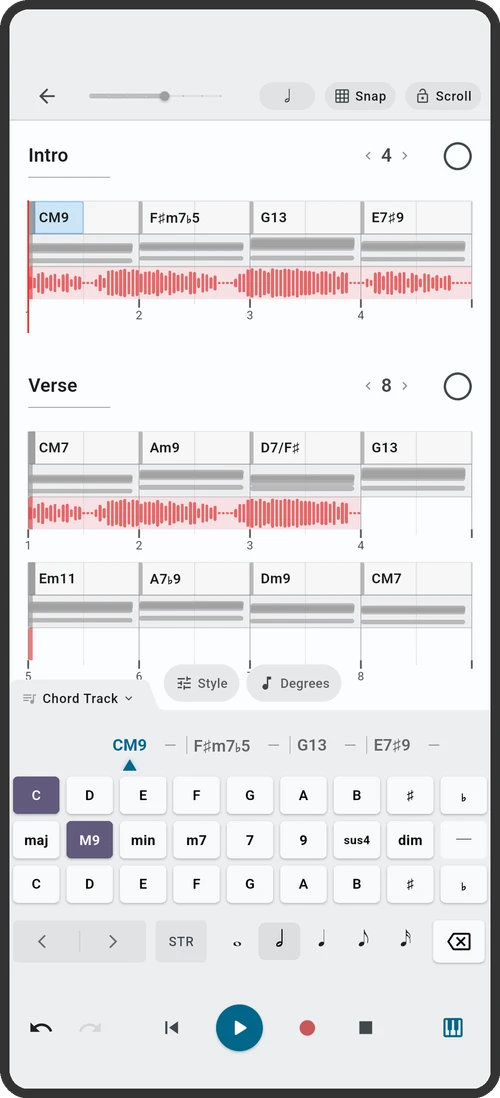
This is where Faso fits. Faso isn't a tab generator — and that's the point. It's a chord-sheet creator with AI-powered chord sheet editing, instant playback with backing tracks, and multi-track recording. You don't write tab for your original song. You build a chord chart, hear it with a full band, and record your performance. The chord chart IS the song's blueprint. The recording IS the song.
How AI Music Tools Actually Work
Whether it's a guitar tab maker transcribing audio or Faso suggesting chord progressions, AI music tools share the same underlying approach: they're trained on thousands of existing songs and learn the patterns that make music work — which chords tend to follow which, which voicings are reachable on a guitar neck, which progressions create which emotional effects.
In Faso, this AI layer shows up as LLM-powered chord sheet editing. You write a chord progression — say, a simple I-IV-V in C. Then you ask Faso's AI to transform it: "make this sadder," "turn this into a jazz progression," "add a bridge section," or "transpose to G and use barre chord voicings." The AI rewrites your chord sheet intelligently — keeping your structure while applying the change you requested. You can accept the result, tweak it further, or revert. You're always in control. The AI is an editor that understands music, not a composer that replaces you.
This is different from a transcription-based ai guitar tab generator that converts audio to tab. Both use AI. Both save time. But Faso's AI is focused on the creation phase — the moment when you're staring at a blank page and need to know what chord comes next.
Why Chord-First Songwriting Wins Over Tab-Perfect Notation
There's a reason professional songwriters in Nashville, LA, and London don't write in tab. They write in chord charts. The chord chart is faster to create, easier to modify, and more flexible in collaboration. Change the key? One tap. Restructure the song? Move the sections. Hand it to a session player? They read chord charts in their sleep.
Tab has its place — learning, teaching, preserving specific performances. But for the creative phase, chord-first is the workflow that turns ideas into songs before the inspiration fades. Faso is built entirely around this philosophy:
- Type your chords. C, Am, F, G — straight into the scrolling chart.
- AI can transform your chord sheet. Want to hear your progression as a jazz tune? Ask the AI to "add ii-V-I cadences." Need a sadder version? "Turn this into a minor progression." The AI rewrites your chart while keeping your song structure.
- Hear it immediately. Tap play. Your progression plays back with drums, bass, and accompaniment.
- Record on top. Guitar, vocals, layers — multi-track recording on the same screen as your chord chart.
The Faso AI Workflow: From Idea to Song
Here's how Faso's AI-assisted approach turns a blank page into a song, step by step:
- Pick a key. Not sure? The AI works in any key. Start with C major — no sharps or flats to worry about, and it fits most vocal ranges.
- Enter your first chord. Most songs start on the I chord (the key's root). In C major, that's C.
- Build a basic progression. Type in a I-V-vi-IV in C: C–G–Am–F. You now have a four-chord loop — the foundation of hundreds of songs.
- Use AI to explore variations. Ask Faso's AI: "add a key change to G for the chorus," or "replace the IV chord with a ii-V-I turnaround in the last two bars." The AI rewrites your chord sheet based on your instruction. Review, tweak, or keep the result.
- Hit play. Set your tempo and style. Faso generates backing tracks — drums, bass, keys — that follow your chord chart. You're now hearing your progression with a full band.
- Record. Grab your guitar. Plug in. Hit record. Play over the backing track. Layer vocals. Add a second guitar part. The chord chart scrolls in time with the playback — you always know where you are.
Your First Session With AI-Powered Chord Creation
The best way to understand the difference between a guitar tab maker and Faso's chord-first AI workflow is to try it. Here's what a first session looks like — not a tutorial, not a manual, just the actual creative sequence:
- Open Faso. New chord sheet. Key of C.
- Type your progression. C–G–Am–F. Four chords, I-V-vi-IV. The most-used progression in pop music. Hit play and hear it with a full band.
- Label this section "Verse." Add a "Chorus" section. Same chords, different order — Am–F–C–G. Now you have structure.
- Set tempo to 90 BPM. Choose a rock or pop style. Hit play. Hear your song with drums, bass, and accompaniment.
- Record a scratch vocal. Doesn't need to be good. Hum the melody you hear over the chords. Record a guitar part. Layer a second vocal harmony.
- Save and export. You now have a chord chart, a backing track, and recorded audio — all from one session in one app. That's a song.
Write songs, not notation
Faso's LLM-powered chord sheet editing, instant backing tracks, and multi-track recording give you a creative, tab-free workflow. Write your progression, ask AI to transform it, and record your song — all in one session.