You have a melody in your head. Maybe a lyric fragment. You sit down to turn it into a song — and the first thing you hit is a wall of logistics. What key? Which chords fit? How do I write this down so I don't forget it in ten minutes? How do I hear what it actually sounds like with a full arrangement?
A chord sheet creator solves all of this. It's a tool that lets you pick a key, build a chord progression, write it as a clean chord chart, and hear it back — all without touching a sheet of manuscript paper or learning traditional notation. If you've ever wished you could go from "idea" to "song" in one session instead of three, this guide is for you. And if you're looking for a music composition app that does all of this on your phone, you're in the right place.
How a Chord Sheet Creator Actually Works
A chord sheet creator replaces the friction: instead of manually writing out chord charts, memorizing key signatures, or recording rough demos just to test an idea, you type your chords into a scrolling chart — and the app does the rest. Instant playback so you hear your progression. Automatic transposition when the key needs to change. Built-in recording to capture melodies the moment they hit you.
Unlike traditional music notation software — which asks you to specify every note, every duration, every dynamic marking — a chord sheet creator asks one question: what are the chords? That one shift eliminates the learning curve. You don't need to read music. You don't need to know theory. You need to know which chords you want, and the app handles everything else.
The chord-first philosophy
Most songs don't need notation. They need a chord progression, a melody, and a structure. Faso gives you the progression and structure instantly — pick a key, build your chart, hit play. The melody comes from you, humming over the playback and recording as you go. This is how working songwriters actually write: chords first, details later.
Here's what this means for your actual workflow in Faso:
- Instant transposition. Singer needs the song a step lower? Tap the key change and every chord updates automatically across the entire chart.
- Playback on demand. Wrote a progression. Does it work? Hit play and hear it with drums, bass, and accompaniment — no rough demo needed.
- Shareable charts. Export your chord sheet. Your bassist, co-writer, producer — everyone sees the same chords in the same format.
- Everything in one place. Chords, playback, recording — not spread across a notation app, a voice memo app, and a DAW. One tool, one session.
Chord Chart Generation: From Numbers to Music
A chord chart generator turns your chord choices into a clean visual reference. You pick the chords — say, I–V–vi–IV in C major — and the tool renders a chart showing C, G, Am, F in sequence, formatted exactly like a lead sheet. This is the format that session musicians, bandmates, and producers expect.
The best part: the chart is key-agnostic. Write your song in C, but your vocalist needs it in D? Change the key and the entire chart updates. The Roman numerals (I–V–vi–IV) stay the same — only the letter names change. This is the workflow that Nashville session players have used for decades, now available without learning the Nashville number system.
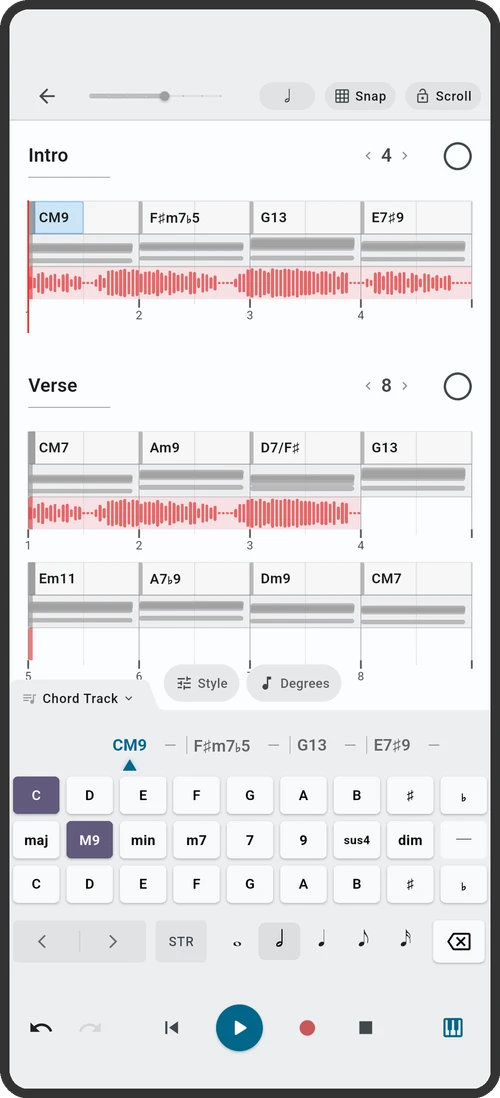
Faso's chord sheet view gives you exactly this: a scrolling chord chart you can edit on the fly, with instant playback at any tempo. Add sections — verse, chorus, bridge — and the chart organizes itself. No notation. No theory. Just the chords, where you need them, when you need them.
Guitar Tab Creator and Chord Builder in One Place
For guitarists, a guitar tab creator and a guitar chord builder serve different needs. The tab creator lets you write out specific note-by-note parts — lead lines, riffs, fingerpicking patterns. The chord builder helps you find and voice chords — "what's a Cmaj7 that's easy to reach from this G?"
Most songwriters don't need tab-level detail for every part. What they need is to know the chords and have the freedom to record audio on top. Faso's workflow is built for this: the chord sheet gives you the harmonic map. The multi-track recorder captures your guitar, vocals, and layers. You don't write tab for a strummed acoustic part — you just play it and record it. The chord chart keeps you oriented; the recording captures the performance.
Backing Tracks: Write With a Full Band, Even Solo
A backing track creator generates accompaniment from your chord progression — drums, bass, keys, whatever the arrangement calls for. This is the feature that transforms a chord sheet creator from a notation tool into a music composition app. You're not just writing chords on a page. You're hearing them in context, with a rhythm section, at your chosen tempo and style.
Why this matters for songwriting:
- Melodies come faster over real accompaniment. Humming over a full band track produces better melodies than humming over silence. The backing track gives you harmonic and rhythmic context that pulls ideas out of you.
- You hear arrangement problems immediately. A chord change that looks fine on paper might feel rushed or awkward when played back at tempo. Backing tracks catch these issues early, before you've invested time in a full recording.
- You can write anywhere. Phone + headphones = a full band backing track, on a train, in a park, at 2 AM when you can't make noise. You don't need a studio. You don't need other musicians. You need your chords and the playback.
In Faso, backing tracks are built into the chord sheet: set your tempo, choose a style, and the app generates drums, bass, and accompaniment that follow your chord chart. Record your vocals and instruments on top. You're writing with a band — even when you're the only person in the room.
What Makes a Chord Sheet Creator Actually Great
Not every chord sheet creator is built the same way. After thousands of songwriting sessions, here's what separates the tool that actually helps you finish songs from the tool that just adds another icon to your home screen:
- It starts from chords, not notation. Faso puts the chord chart at the center of the screen. You type chords — C, Am, F, G — and they appear in a scrolling chart. No staff lines. No note heads. No theory prerequisites. The chart is the song.
- Playback is instant and musical. In Faso, you tap play and hear your progression with drums, bass, and accompaniment — at any tempo, in any style. No exporting. No routing to another app. You type a chord, you hear a band.
- Transposition is one tap. Change the key in Faso and every chord in the entire chart updates instantly. Verse, chorus, bridge — all transposed. You don't recalculate a single chord.
- Recording is built in, not bolted on. Faso gives you multi-track recording on the same screen as your chord chart. The chart scrolls in time with playback while you record vocals, guitar, and layers. No switching apps mid-idea.
- It's on your phone. Faso is designed for mobile first — because song ideas don't wait for you to get to your computer. The idea that hits you at the bus stop, in the park, at 2 AM — that's the one you capture.
Your First Session: From Blank Page to Song
Here's what a first songwriting session in Faso looks like — not theory, not setup, just the actual workflow from blank chord sheet to a song you can play back:
- Pick a key. C major if you're not sure. It's the middle of the vocal range for most people and it has no sharps or flats to think about.
- Pick a progression. I–V–vi–IV (C–G–Am–F) if you want a proven starting point. The tool shows you the chord names — you don't need to calculate them.
- Set a tempo and style. 90 BPM, basic rock or pop feel. Hit play. Hear your four chords loop with a full band backing.
- Hum a melody. Don't write lyrics yet. Don't think about structure. Just loop the progression and hum until something sticks. Record the hum.
- Add a second section. Duplicate the progression for a chorus, change the tempo or key if needed. Now you have a verse and a chorus — that's a song structure.
- Record. Layer vocals, guitar, whatever you have. The chord chart scrolls in time with the playback. You're not reading notation — you're following the chords you wrote.
Write songs, not notation
Faso is built for this exact workflow: a chord-sheet canvas with instant playback, backing tracks, and multi-track recording — all on your phone. Pick a key, choose your chords, and start your first session now.